• Use VideoPress (and a lot more) on your self-hosted blog with Jetpack!

    If you have a self-hosted site and use VideoPress for video uploads, you’ve needed to sign up for VideoPress, install the VideoPress plugin, and then sign in to WordPress.com to actually manage and upload video files.

    You can keep doing that if you’d like, but using VideoPress on a self-hosted site is now simpler: we’ve added VideoPress support to the powerful Jetpack plugin. Along with Jetpack’s other impressive features, like social sharing, image optimization, and commenting with integrated social media logins, Jetpack now manages and streamlines your VideoPress account.

    What does it all mean? This:

    • The standalone VideoPress plugin opens WordPress.com media administration tools — so you have to be logged in to WordPress.com to use it.
    • The Jetpack plugin hooks directly into WordPress.com and handles the authentication for you, no separate login required.
    • By making VideoPress part of Jetpack, Jetpack becomes your middleman, allowing you to work with video without being logged in to WordPress.com.

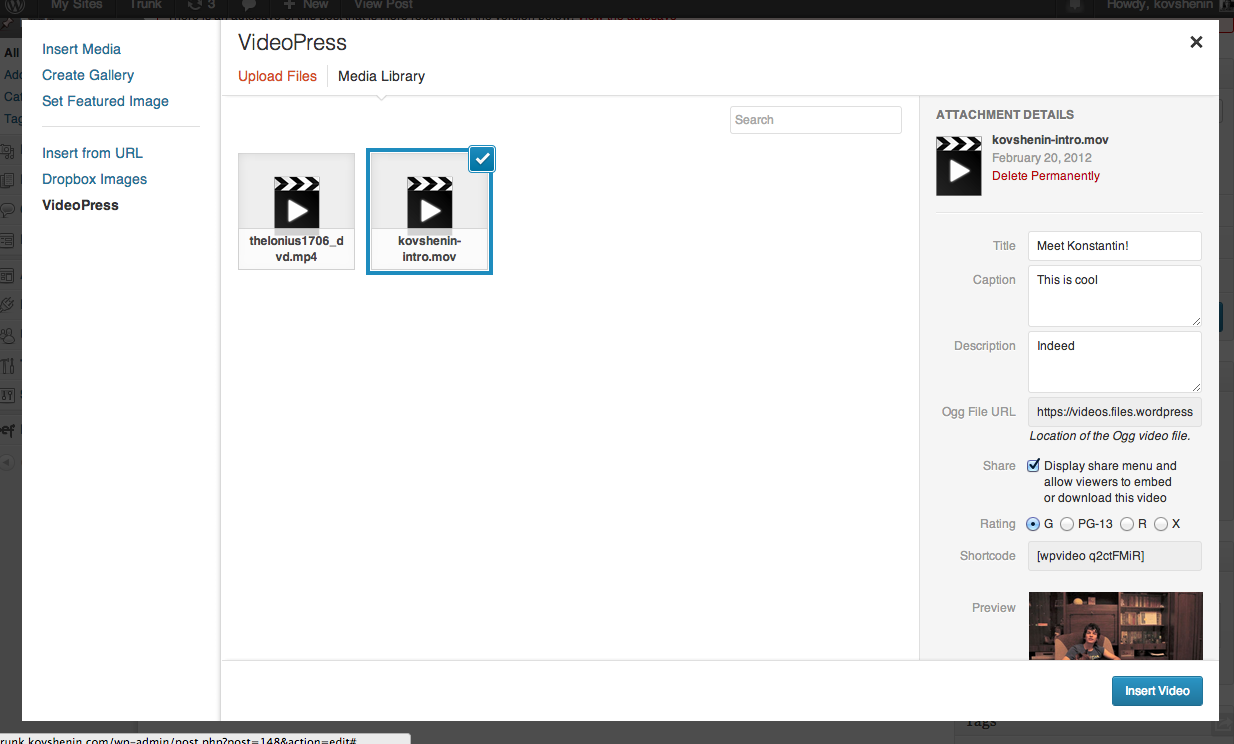
    Now, you can upload and manage videos right from the Media Manager in your dashboard:

    videopress

    Nothing changes for your site visitors, but your job as the administrator just got way easier.

    Going forward, upgrades to VideoPress will all happen through Jetpack, so we encourage you to install it now and disable your stand-alone VideoPress plugin. Check out the new VideoPress support document for more detail!
    0.000000 0.000000

    Michelle Weber

    October 10, 2013
    Plugin
    Jetpack, plugins
  • VideoPress + Jetpack = Using VideoPress on Your Self-Hosted Site is About to Get Easier

    Right now, if you’re using the VideoPress plugin on your self-hosted WordPress blog, you have to be signed in to your WordPress.com account to actually upload and work with your videos — not a huge deal, but not as streamlined as it could be.

    Coming soon, that’s going to change: VideoPress is joining the Jetpack family, and will use the Jetpack API for authentication. (Yet another reason to install Jetpack if you haven’t already!)

    What does this actually mean? In a nutshell:

    • The current VideoPress plugin just provides you with an iFrame that opens up the WordPress.com video administration tools. You have to be logged in to WordPress.com to use it, and so do any other people who want to upload videos to your site.
    • The Jetpack plugin hooks into WordPress.com, giving your self-hosted site access to sweet .com features like social sharing and tiled media galleries without having to be constantly logged in to WordPress.com. Jetpack takes care of all the authentication for you, so you can focus on your site.
    • By making VideoPress part of Jetpack, we give it that same ability . You’ll be able to upload and work with video without being logged in to WordPress.com, because Jetpack will be your middleman.

    Not only will this simplify the process of using VideoPress, it will also allow us to integrate VideoPress with the spiffy new Media Manager that shipped with WordPress 3.5:

    videopress screenshot

    If you use the VideoPress plugin, be sure to install Jetpack so you can take advantage of these improvements. Keep an eye on this blog and on the Jetpack Blog, and be the first two know when the VideoPress/Jetpack marriage is finalized!

    Michelle Weber

    March 22, 2013
    Plugin
    Jetpack
 

Loading Comments...