• Add Another Dimension to Your Site With Video

    As a blogger, you pore over your choices of words and images to make sure you’re communicating exactly what you intend to your readers. Why not add another tool to your arsenal? Using video can be an awesome way to illuminate, instruct, or just create a different kind of connection with your audience.

    You might think that video is just for news sites or college kids with too much time on their hands.  Think again — video can be used to enhance your content in lots of ways:

    • Were you going to include a photo gallery? Try video instead.
    • Do you write a DIY or cooking blog? Host your own show.
    • Mommyblogger? We’d love to see your rugrats’ antics.
    • Write a travel site? Give us the flavor of the medina you just visited in Casablanca with a video tour.
    • Use your blog as a journal? Try talking right to the camera to add a raw dimension to your musings.

    Now that you can shoot high-quality video with a DSLR camera or mobile phone, the sky’s the limit. Heck, you can upload videos directly from your iPhone to your blog!

    Once you have that perfect clip to push your post over the top, upload it right to your site with VideoPress, available both as a plugin for self-hosted WordPress.org sites and as an upgrade for WordPress.com sites. VideoPress is made to work with WordPress, so uploading couldn’t be simpler. And since you’re uploading the video right to your own site, there are none of the downsides of using a third-party video service: no ads, no maximum length for what you can upload, and best of all, no redirecting, so your readers start and end on your video and stay on your site the whole time.

    Since VideoPress is an Automattic joint, you know the technical side (that is, the side you never have to worry about) is going to be clean and efficient. VideoPress automatically selects the best video player for your viewers. Readers see a preview, including a title and preview image, as the full video loads. The preview is lightweight and HTML-based, so the rest of your page loads with no lag time.

    WordPress and VideoPress work together to make publishing online video easy as can be, so the only limit is what you can capture.
    Michelle Weber

    December 6, 2012
    Community
    Blogging, Multimedia, Video, VideoPress
  • Stanford d.school chooses VideoPress for their crash course in design thinking

    The Hasso Plattner Institute of Design, otherwise known as the d.school at Stanford University, is an interdisciplinary program where graduate students from across Stanford learn to become innovators by tackling big challenges together.

    To help encourage innovation and spread design thinking around the world, the d.school recently launched a prototype Virtual Crash Course in Design Thinking which allows you to learn design thinking methodologies and sample what the d.school has to offer.

    The crash course aims to help people to grow their own capacity to innovate, to experience a different way of working, encourage collaboration, a chance to do hands-on prototyping, and most importantly, help participants apply design thinking to their work and creative projects immediately after they complete the course.

    Take the Crash Course

    The Crash Course in Design Thinking has three parts:

    • The Gear Up! Section lists the instructions required for the course.
    • Go For a Ride! features the crash course video.
    • The Chart a New Course section challenges you to apply your new-found learning to your work and creative projects.
    • We’re proud to say that the d.school chose VideoPress as a natural fit to display the video on the crash course site.

      “VideoPress helped us easily get our videos up and running on our WordPress site with minimal effort in a short amount of time,” says Bruce Boyd, the d.school’s Director of Technology.

      Open source heat map connects participants worldwide

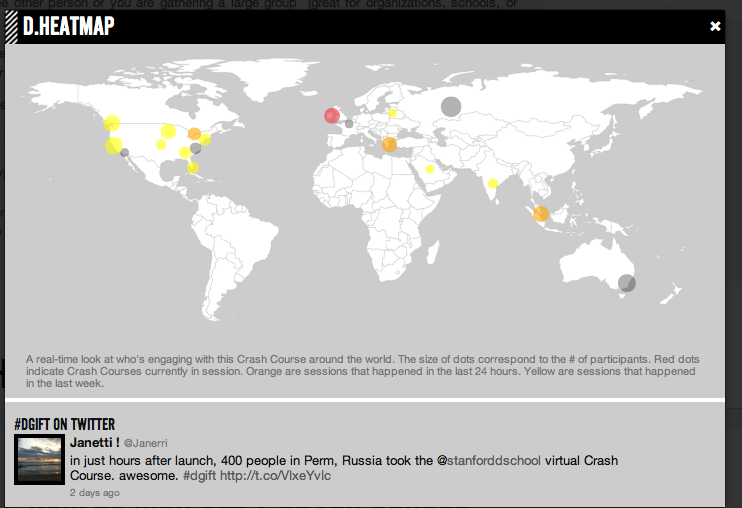
      The project offers an amazing open source heat map that has helped create a social connection among people doing the crash course around the world. When you click on the Crash Course video, you can select whether you want “check it out,” or “run a crash course.” If you say that you’re running a crash course, you’ll be asked for your name, email address, and the number of people taking the crash course. This information gets placed on a heat map where the size of the dots corresponds to the size of the group. Within 24 hours of launch, the reach of the virtual crash course extended across eight countries, which included a 400 person workshop in Perm, Russia.

      This virtual creative learning experience was built to help scale the Design Thinking Bootcamp that’s also featured in the d.school’s Executive Education program. With a very lean team trying to accommodate a high demand for training in Design Thinking, Jeremy Utley (Director of Executive Education) and Scott Doorley (Creative Director of the d.school) developed an initial prototype of the video. Within a few months, and with a lot of aid from partners all over the world, a simple video turned into a plug-and-play virtual course, delivered to the world for free. As of this month, there have been close to 1500 participants, across 22 countries.

      Go for a test drive: visit the Virtual Crash Course page.

      Learn more about why VideoPress is the best way to upload video content to your blog.

    Krista Stevens

    April 18, 2012
    Community
Previous Page
1 2
 

Loading Comments...