Skip to content
  • Limit video playback to specific domains

    VideoPress helps your video content spread virally across the web through WordPress shortcodes and HTML embeds. We realize not every publisher would like to see his or her video spread across the web and offer two options to restrict distribution: no advertised embed method and restricting embeds to a specific domain. Publishers using the VideoPress plugin for WordPress may choose to restrict playback to just their blog domain.

    VideoPress restricted embed

    Websites embedding restricted content will see the message displayed above, indicating video embeds are disabled for the given domain. Publisher may override this default behavior for specific domains through the media settings of the WordPress.com blog with a VideoPress upgrade.

    VideoPress blog settings

    Log in to the administrative interface associated with your WordPress.com blog to configure new settings for embeds across all the blog’s videos. Media preferences are located at https://[blog_domain].wordpress.com/wp-admin/options-media.php

    Enter a comma-separated list of allowed domains into the “Restrict embed playback” text field. You may also optionally choose to disable advertised embeds by default.

    VideoPress video embed preference

    Restricted playback only applies to videos with limited embed options. Make sure to uncheck the embed option on new video uploads to limit Flash player behavior.
    37.775944 -122.412796

    Niall Kennedy

    March 10, 2010
    Embeds
  • Share videos on Facebook

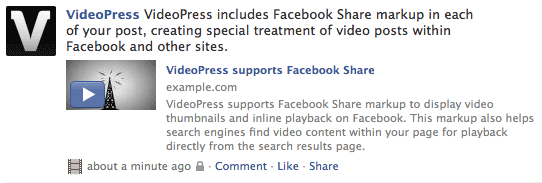
    VideoPress supports inline video playback on Facebook, extending the reach of your content inside the application hundreds of millions of people use to share blog posts and videos every day. Blog posts with a single VideoPress video include special Facebook Share markup to easily expose your video’s thumbnail and Flash player information when a link to your post appears in a status update. The same special markup also improves the visibility of your content in Google search and by Yahoo! Search results.

    VideoPress Facebook Share

    Links to blog posts with video receive special treatment in the Facebook news feed. A small thumbnail image appears alongside your post’s title and excerpt, encouraging playback. Status updates with video receive special handling by Facebook’s news feed ranking algorithms, increasing the chances your post will be displayed on more news pages.

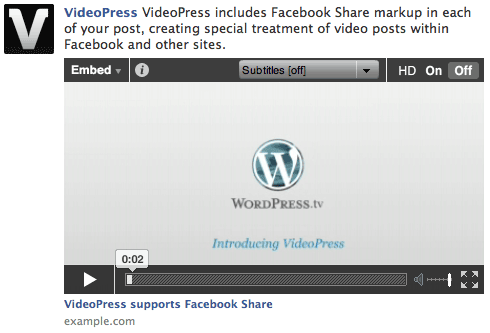
    VideoPress Facebook Share playback

    VideoPress supports direct playback from the Facebook news feed. Any Facebook user can click your video thumbnail to view the full video inside the context of the shared item. A link to your full blog post is also just a click away.

    Facebook Publicize with VideoPress

    WordPress.com recently added Facebook Publicize the ability to automatically publish new posts from your blog into your Facebook news stream. VideoPress includes special video markup with every new Facebook Publicize post. Your readers will see your video details, thumbnail and full video player directly within their Facebook news feed.

    37.775944 -122.412796

    Niall Kennedy

    March 5, 2010
    Social
    facebook

Loading Comments...